
Claude Code Skills: What Running 78 of Them Taught Me
Key takeaways
- A Claude Code skill is a folder with a
SKILL.mdfile. Claude reads its description in every session and loads the body only when a request matches it. - The description decides whether a skill fires. All 78 skills in my library put the trigger in plain words: “Use when…”, “Use on…“. Claude Code cuts a description off at 1,536 characters.
- Descriptions cost context in every session. My 78 cost 15,273 characters, about 3,800 tokens, before I type a word. Bodies and reference files cost nothing until they load.
- Write a skill from work you’ve done twice, or a mistake that cost real time. Fix the skill you have before you add a new one, or the list doubles without getting better.
I run an agency, 4 apps and a content pipeline through Claude Code, and the work lives in skills. On 11 Nov 2026 the main repo loaded 78 of them, from seo and swift to rentals and taxes-irs. Most guides on this topic walk you through the format. This one does too, briefly, then gives you what the format docs can’t: what a real library costs, and what broke.
You can browse the skills themselves on the skills page.
A skill is a folder with one file
A skill is a set of instructions Claude loads when it needs them. It’s a folder named after the skill, with a SKILL.md file inside. The file opens with a short YAML header, and the rest is Markdown.
---
name: changelog
description: Writes the changelog entry for a release. Use when tagging a version, on "write the changelog" or "what changed since v1.2".
---

# Changelog

1. Run `git log --oneline <last-tag>..HEAD`.
2. Group the commits under Added, Changed and Fixed.
3. Write each line for a user, not a developer.
That’s a working skill. Claude can pick it on its own when your request matches the description, or you can call it with /changelog. Skills follow the open Agent Skills format, so the same folder works in other tools that read it. I write mine in one source folder, and a script copies all 78 into .claude/skills and .agents/skills.
Custom slash commands are now skills too. A file at .claude/commands/deploy.md and one at .claude/skills/deploy/SKILL.md both create /deploy.
Personal, project and plugin skills
Where you save the folder decides which sessions see it.
| Where | Path | Loads in |
|---|---|---|
| Personal | ~/.claude/skills/<name>/SKILL.md | Every project on your machine |
| Project | .claude/skills/<name>/SKILL.md | Sessions in that repo, for everyone who clones it |
| Plugin | <plugin>/skills/<name>/SKILL.md | Wherever the plugin is on, as /plugin:name |
Type /skills in a session to list your skills, grouped as personal, project or plugin. Keep most of yours at project level, because a skill checked into the repo travels with the code it describes.
The description is the trigger
There’s no router. Claude sees all the descriptions at the start of a session and matches your request against them. So the description is the whole trigger. If it misses, Claude never reads the body.
All 78 descriptions in the library follow one shape: the job in a few words, then “Use when” or “Use on” with the words people type. Here’s the real one for the Search Console skill:
Runs Google Search Console through its API: orphan and cannibal queries, sitemaps, indexing audits. Use on ‘GSC’, ‘Search Console’, ‘not indexed’, ‘cannibalisation’, ‘request indexing’.
The quoted phrases matter most. People don’t say “perform an indexing audit”. They say “why isn’t this indexed”. The median description in the library is 208 characters and none passes 400, well under Claude Code’s cutoff of 1,536 characters for the description and when_to_use together. Put the main use first, since the end is what gets cut.
When a skill doesn’t fire, test it in a fresh session with the exact sentence you’d type. If it still doesn’t fire, add that sentence’s words to the description. When the wrong skill fires, the 2 descriptions overlap: name what each one is not for (“Web search is seo”).
The context cost of 78 skills
Skills load in 3 layers, and you pay for only the first one in every session.
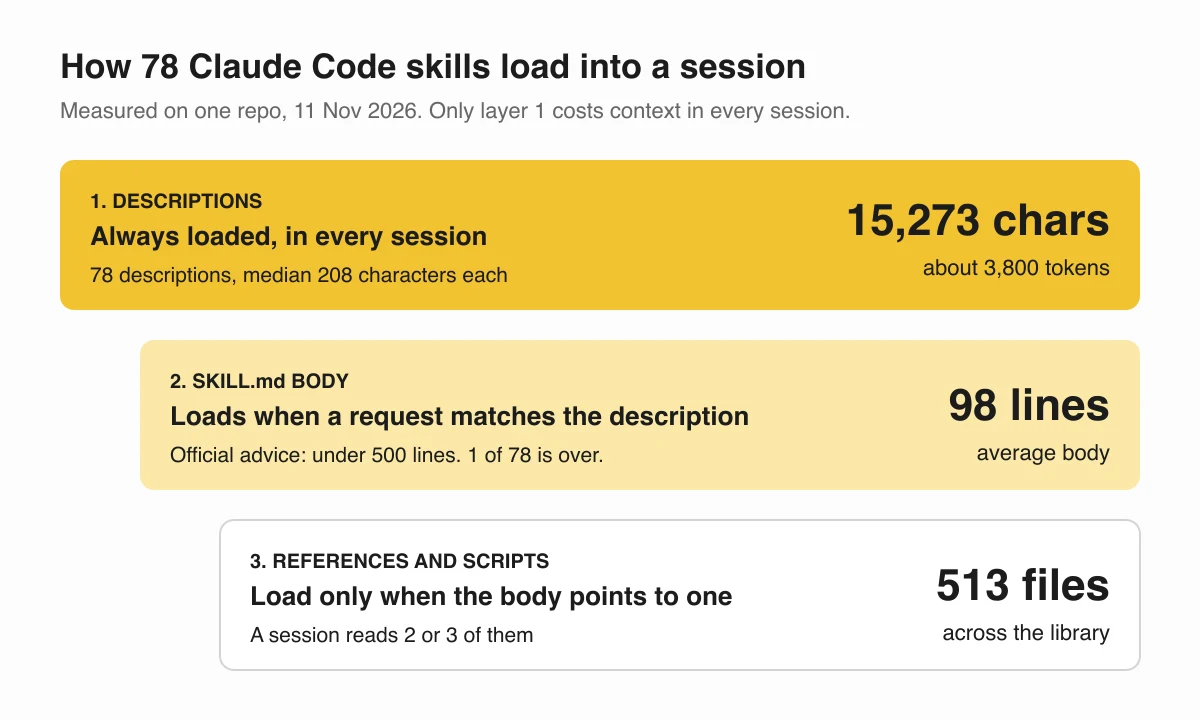
- Descriptions, in every session. The 78 add up to 15,273 characters, about 3,800 tokens, before you’ve asked for anything.
- The
SKILL.mdbody, once the skill fires. The library averages 98 lines per body. The official advice is to stay under 500, and only one passes it, a 507-line file Apple wrote. - Reference files and scripts, only when the body points to one and the task needs it. The library holds 513 reference files, and a session reads 2 or 3.
That layering is why a big library stays cheap. The trap is turning it off by accident. Subagents can preload skills whole at spawn. One agent in the library listed 8 skills that way and started every run 14.8k tokens down. The fix was to preload its 3 core skills and let it call the rest through the Skill tool when a task needed them.
5 rules from running 78 skills
These came from runs that went wrong, not from planning.
1. Write a skill from work done twice
A skill should come from a task you’ve done twice or a mistake that cost you real time, never from a plan for how work should go. A skill from real work gets the details right. A skill from a plan reads well, and Claude skips past it.
2. Fix the skill you have before writing a new one
Search the descriptions first. If one covers 70% of the job, strengthen it. A new file next to an old wrong one is how a list doubles without getting better, and both then fire on the same requests.
3. End with a done list
The skills in the library all end with a “Done when” checklist: what must be true before Claude can call the job done. For seo, one line is “the page has something the top 3 results don’t”. It turns “looks done” into a check.
4. Write down what each run taught it, with the date
When a run goes wrong, the fix goes into the skill as one line with the date and the number: “2 posts in one brief ran out of turns before the first one existed (3 Nov 2026)“. A dated line tells the next run why the rule exists, and tells you when it’s old enough to question.
5. Keep the body short and point outward
A body that tries to hold everything gets skimmed. Write yours as a router: a few steps, then “read references/local.md for local search”. Detail lives in the reference files, where it costs nothing until a task needs it.
Skills, CLAUDE.md, subagents and MCP
These overlap, so here’s how to split them.
| Use | For | Loaded |
|---|---|---|
CLAUDE.md | Rules for every task in the repo, like which package manager to use | Always, in full |
| Skill | How to do one kind of task | Description always, body on demand |
| Subagent | A task that needs its own context window | When you or Claude start one |
| MCP server | A connection to an outside tool or data source | Tool names at start |
If a rule applies to every task, it goes in CLAUDE.md. If it applies to one kind of task, it’s a skill. That one test settles most “where does this go” questions.
FAQ
What is a Claude Code skill?
A folder with a SKILL.md file: a short YAML header (name and description) and a body of instructions. Claude reads every description up front and loads the body only when your request matches it, or when you type /skill-name.
Where do Claude Code skills go?
Personal skills go in ~/.claude/skills/<name>/SKILL.md and load in every project on your machine. Project skills go in .claude/skills/<name>/SKILL.md inside a repo and load for anyone who works in it.
Why doesn’t Claude use my skill?
Almost always the description. Claude picks a skill by matching your request against it, so it has to name the task and the words people really type, for example “Use when a build fails”. Test it in a fresh session with the phrase you expect.
How many skills is too many?
There’s no hard cap, but each description sits in the context of each session. 78 descriptions cost 15,273 characters, roughly 3,800 tokens, before you type anything. Merge 2 skills that answer the same request before you add a third.
Field names and limits checked against Anthropic’s skills documentation on 11 Nov 2026.